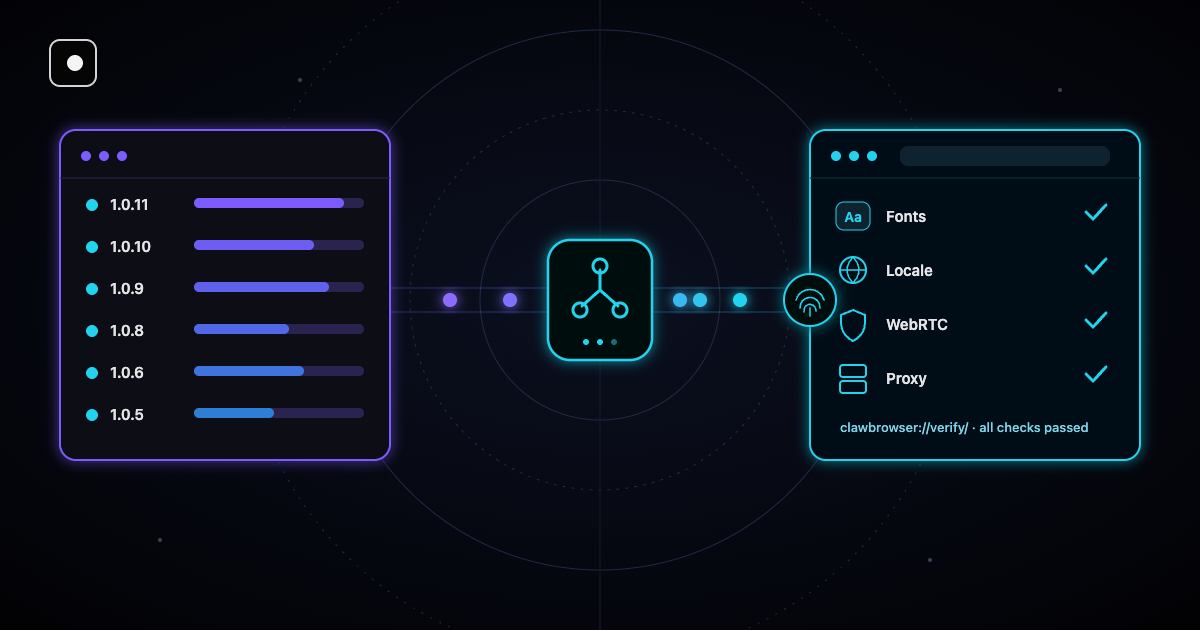
Anti-bot systems rarely flag a browser profile for one odd signal. They flag it when two signals disagree: the network says one thing, the fingerprint says another. Every gap like that is enough for a site to stop trusting the session.
The latest Clawbrowser update closes several of these gaps. Here is what's new in Clawbrowser, starting with the changes that affect your profiles and proxies the most, and how we tested each one.
TL;DR: Manual proxies now stay bound to their profile, every Windows profile has its own data folder, Windows profiles render with real Windows fonts, and the browser language and WebRTC no longer give away your real machine. Run clawctl update to get it.
Proxies and profiles you can rely on
The most important changes are for people who run many profiles side by side or bring their own proxies. Our 4-layer defense stack explains why the network and the fingerprint have to tell the same story.
- Your own proxy stays put. A profile with a manual proxy now keeps it when its fingerprint is refreshed. Before, a refresh could drop the proxy.
- One data folder per profile on Windows. Managed profiles used to share one data folder. Now each profile has its own, so cookies and storage never mix between profiles. If your agents keep logins between runs, read about session persistence for AI agents.
- A sandboxed network service on Windows. On a fresh profile the part of the browser that handles network traffic could crash and restart outside its security sandbox. Now it always starts inside it. Microsoft explains how this sandbox works in its notes on AppContainer isolation.
- Stable canvas drawing. Managed profiles on Windows now always draw canvas graphics the same way.
When the city you asked for has no proxy
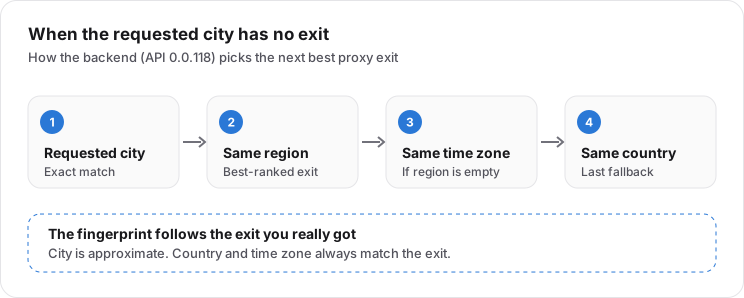
If no proxy exit is available in the city you requested, you now get the best exit in the same country. Clawbrowser looks in the same region first, then in the same time zone, then anywhere in the country.
The profile's city and time zone are then set to match the exit you really got. The city can be approximate, but the country and the time zone always match.
Windows profiles now use real Windows fonts
Fonts are one of the easiest things for a website to measure. A page can draw text off screen and check its exact width, which tells it which fonts the computer really has.
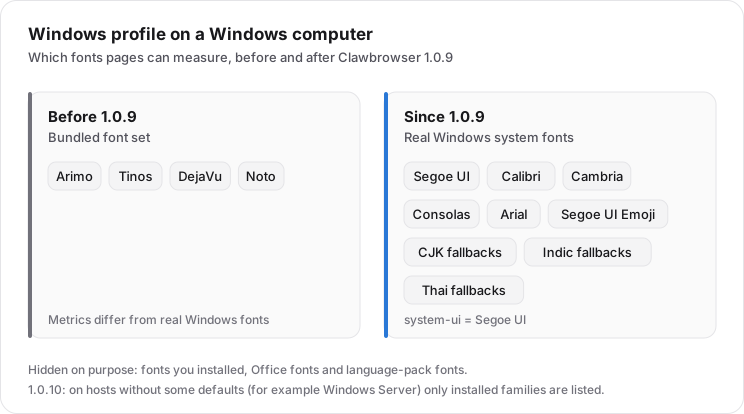
Until now, a Windows profile running on a Windows computer drew text with fonts bundled into the browser: Arimo, Tinos, DejaVu and Noto. They look close to the originals, but their measurements are different, and a site comparing them with a real Windows install could see the mismatch.
Now a Windows profile on a Windows computer uses the system's own fonts. It shows only the families that come with every Windows 10 and 11 install: Segoe UI, Calibri, Cambria, Consolas, Arial, Segoe UI Emoji and the fallback fonts for Asian, Indian and Thai scripts. The default interface font (system-ui) is Segoe UI, exactly like on a normal Windows PC.
Two details make this safer:
- Your own fonts stay hidden. Fonts you installed, Office fonts and language-pack fonts are not shown to websites. A rare font list would make your profile unique, which is the opposite of what you want.
- Only fonts the computer really has. Windows Server lacks some standard families, such as Tahoma, Candara, Sitka and Yu Gothic. Profiles used to list them anyway, so a page could see fonts the machine could not draw. Now the browser checks which standard fonts are installed and shows only those.
Want to know which other signals sites compare? Our guide to browser fingerprinting signals covers all 20.
The browser language now matches the profile
Websites can read your language in two places. One is the language list the browser sends (navigator.languages). The other is JavaScript's date and number formatting, which has its own default language (the Intl locale).
Before this update the second one came from your computer. So a Russian profile on an English Windows machine said "Russian" in one place and "English" in the other. Now both follow the profile's language. The browser's own menus still use your system language, so nothing changes for you.
| What a site checks | Russian profile on English Windows, before | After the update |
|---|---|---|
| Browser language list | ru-RU |
ru-RU |
| JavaScript date and number language | en-US |
ru-RU |
| Browser menus (not visible to sites) | English | English |
The WebRTC leak is closed
WebRTC is the browser technology behind video calls. It can reveal your real network address through a side channel (UDP) that skips the proxy. That path is now turned off.
In our production test after the fix, the profile showed no direct address over WebRTC at all, only the proxy.
How we tested the update
Every Clawbrowser build on GitHub lists what was tested and what failed. Here are the numbers for Windows.
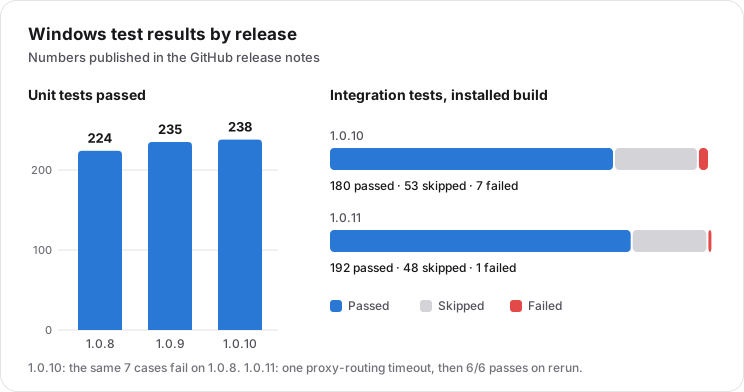
- Unit tests grew from 224 to 238 passing. New integration tests cover Windows fonts, the browser language and how the profile looks from background scripts.
- Integration tests on an installed Windows build went from 7 failures to 1. The one left was a proxy test that timed out once and then passed 6 out of 6 reruns.
- The verify page. We opened
clawbrowser://verify/in a profile with a real Russian proxy three times. All checks passed every time.
Check on clawbrowser://verify/ |
Result in 3 runs |
|---|---|
| Proxy | Passed 3/3 |
| Time zone | Passed 3/3 |
| Languages | Passed 3/3 |
| User agent | Passed 3/3 |
| WebGL | Passed 3/3 |
| WebRTC | Passed 3/3 |
| Fonts | 44 of 44 found, 3/3 |
The verify page itself got more accurate too. It now checks Latin and other scripts separately and waits for fonts that are still loading, so installed Asian fonts are no longer reported as missing.
Known issues
We would rather you hear these from us:
- Windows Server 2025 Server Core. On our test server a managed profile does not start, and
clawctl startreportsLAUNCH_FAILED. Windows Firewall blocks the sandboxed network service from reaching our API. We saw this on that server only. Desktop Windows 10 and 11 were not tested for it, and there is no tested workaround yet. - macOS. The latest macOS build is 1.0.6, and it is not notarized yet. The signing and notarization script for macOS is already in place.
- Docker image.
clawbrowser/clawbrowser:latestis still 1.0.0. The new image has not been published yet.
Release timeline
The update shipped in 11 releases between September 10 and October 21, 2026: six builds of the browser and five of clawctl, the command-line tool. Builds from 1.0.6 on use Chromium 151.
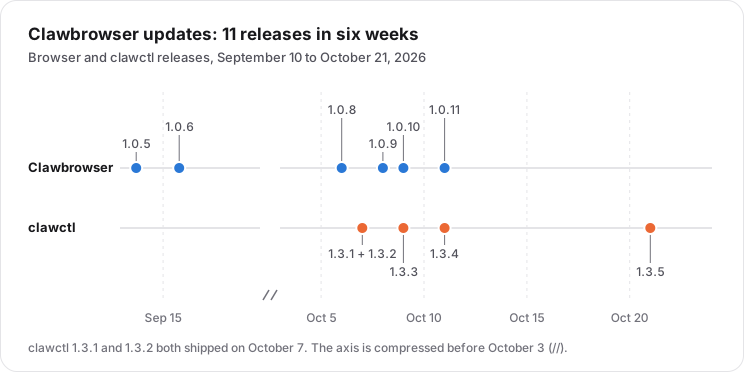
The full notes for every build are on GitHub Releases.
How to update Clawbrowser
If clawctl is already installed, update it, let it install the latest browser build and check the profile:
clawctl update
clawctl install --json
clawctl start --profile work --url clawbrowser://verify/ --json
clawctl verify --profile work --json
On Windows, clawctl install runs the installer silently and Windows may ask for administrator approval. New to Clawbrowser? Start with the CDP developer guide.
FAQ
Which Clawbrowser version should I use?
The latest Windows build is 1.0.11 and the latest macOS build is 1.0.6. clawctl install picks the right build for your computer.
Do I need to recreate my profiles after updating?
No. Profiles keep their fingerprint, proxy, cookies and storage after the update.
Why does my profile show a different city than I asked for?
No proxy exit was available in that city, so Clawbrowser picked the closest one in the same country. The country and time zone always match the exit.
How do I check that the update worked?
Open clawbrowser://verify/ in the profile or run clawctl verify --profile work --json. It checks the proxy, time zone, languages, user agent, WebGL, WebRTC and fonts.
Continue exploring
Ask AI how Clawbrowser helps
Keep reading
Related articles

Free Anti-Detect Browser: Why Clawbrowser Exists
Most 'free' anti-detect browsers give you 2-10 profiles and a timer. Clawbrowser is actually free — unlimited profiles, no session limits, open source, and Chromium-based.
Read article →
Free Anti-Detect Browser for AI Agents: What Actually Works
Most anti-detect browsers charge per profile or per session. Here is what is actually free for AI agent automation, what is free with a catch and how the trade-offs stack up.
Read article →