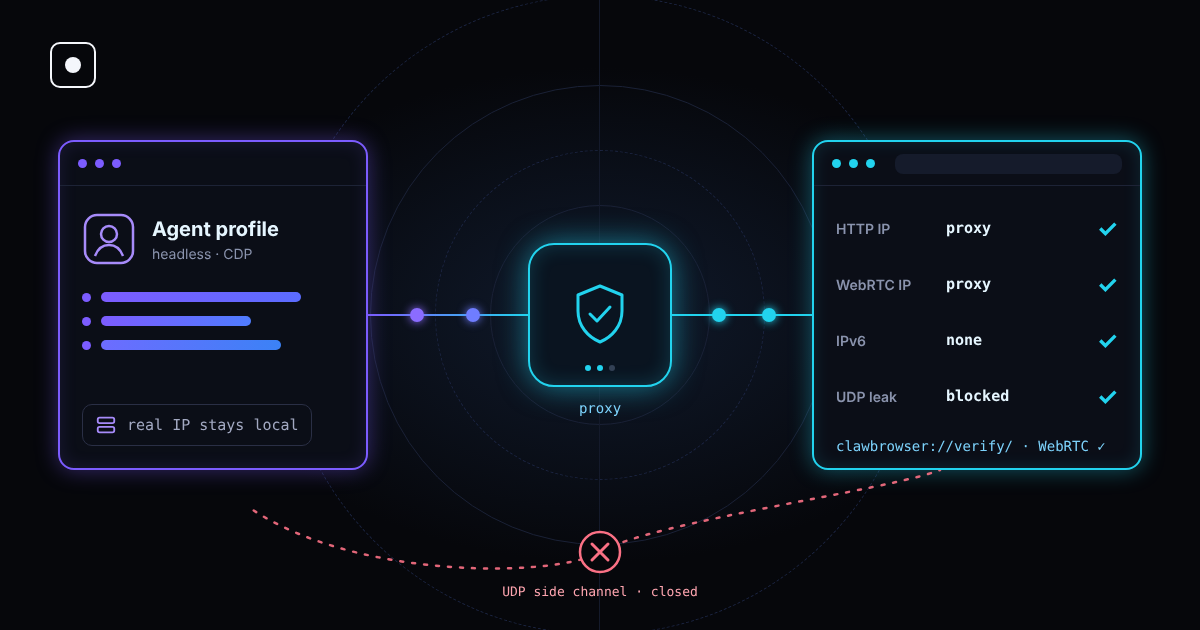
You put your agent behind a residential proxy. Every page request now leaves from an address in the right country. Then the site asks the browser one more question over WebRTC, and the browser answers with the address of the machine your agent actually runs on.
That is a WebRTC leak. It is one of the oldest ways to see through a proxy, and it still works against a lot of automation setups because the proxy is configured correctly and the leak happens somewhere else.
TL;DR: A proxy changes the IP for normal page traffic. WebRTC can open its own connection over UDP that skips the proxy and reveal your real IP. Anti-bot systems compare the two addresses, and a mismatch is a strong signal. Turning WebRTC off is a signal too. The fix is to keep WebRTC working but stop it from using any path outside the proxy. Clawbrowser now does this by default; you can check it on clawbrowser://verify/.
What a WebRTC leak is
WebRTC is the browser technology behind video calls, voice chat and screen sharing. It lets two browsers talk to each other directly instead of sending everything through a server.
To connect directly, a browser has to find out which addresses it can be reached at. It does this in a step called ICE candidate gathering:
- It lists the network interfaces on the machine.
- It asks a public STUN server "what address do you see me at?"
- It collects all of these as candidates that a page can read in JavaScript.
None of this needs a permission prompt. A page can create a connection object, start gathering, read the candidates and close it again in under a second, without a camera, a microphone or a visible call.
The problem is the route. Page traffic goes through your proxy. The STUN request is sent over UDP, and most proxy setups only carry TCP traffic. If the browser is allowed to send UDP outside the proxy, the STUN server sees your real address and reports it back to the page.
Which addresses can leak
| Leaked address | Where it comes from | What it tells the site |
|---|---|---|
| Public IP | STUN reply over UDP outside the proxy | Your real network: the server, office or home the agent runs from |
| Local IP | Network interfaces on the machine | Your private network layout, e.g. 192.168.1.24 or 10.0.0.7 |
| IPv6 address | IPv6 interface or route that the proxy does not cover | A second public address, often unique to the machine |
Modern Chrome hides the local address behind a random .local name by default, so the local leak is less common than it used to be. The public IP and IPv6 leaks are the ones that still hurt.
Why it matters for AI agents
Anti-bot systems rarely block a session for one odd value. They block it when two signals disagree. A WebRTC leak creates exactly that kind of disagreement:
- The request comes from a residential IP in Germany. WebRTC reports a datacenter IP in Virginia. That is the most common case for agents that run on cloud servers.
- Two "different" users show the same WebRTC address. If many profiles leak the same server IP, the site can link all of them together, no matter how different their fingerprints are.
- The proxy IP is in one country and the WebRTC IP is in another. The time zone and language now disagree with one of them.
A WebRTC check is cheap for the site and runs before your agent does anything. It sits next to the other network and fingerprint checks we describe in the 20 signals anti-bot systems use.
How to test for a WebRTC leak
The test is simple: compare the IP your proxy shows with every address WebRTC reports.
- Start the browser profile exactly as your agent uses it, with the same proxy.
- Check the public IP the site sees for normal requests. It should be the proxy IP.
- Open a WebRTC leak test page and look at every candidate it lists.
- If any public IPv4 or IPv6 address differs from the proxy IP, you have a leak.
Run the test after every change to the proxy, the profile or the machine. A setup that passed on your laptop can still leak on a cloud server with an IPv6 route.
In Clawbrowser, the built-in verify page runs this check for you, next to the proxy, time zone, language and fingerprint checks:
clawctl start --profile work --url clawbrowser://verify/ --json
clawctl verify --profile work --json
Common fixes and their trade-offs
There are several ways to stop the leak. Most of them trade one signal for another.
| Fix | What it does | Trade-off |
|---|---|---|
| Disable WebRTC completely | Removes the WebRTC API from the page | Real Chrome always has WebRTC. A browser without it looks automated |
| Browser extension that blocks WebRTC | Blocks or edits the candidates in JavaScript | Extensions can be detected, and many only hide the local IP |
Chrome policy default_public_interface_only |
Uses only the default public interface | Still sends UDP outside the proxy, so the public IP can leak |
Chrome policy disable_non_proxied_udp |
Allows WebRTC UDP only through a proxy that supports it | Closes the leak; WebRTC stays available but cannot go around the proxy |
| Route all traffic through a VPN or tunnel | Sends UDP through the tunnel too | Needs network setup on every machine, and IPv6 must be covered |
The key point: "turned off" is not the same as "hidden." Removing WebRTC hides your IP but tells the site something is unusual. The goal is a browser that behaves like a normal browser with WebRTC, while the only address it can ever reveal is the proxy's.
If you use Playwright or Puppeteer with stock Chromium, you set this up yourself: a WebRTC IP handling policy, IPv6 coverage and a test after every proxy change. And it has to be right on every machine your agents run on.
How Clawbrowser handles WebRTC
Clawbrowser is a managed Chromium runtime for AI agents. Each profile comes with its own fingerprint and proxy, and the browser is responsible for keeping the network and the fingerprint consistent.
In the latest update, we closed the WebRTC leak at the browser level:
- The side channel is off. WebRTC can no longer send UDP that skips the proxy.
- WebRTC still exists. Pages see a normal browser with WebRTC, not one with the API removed.
- Only the proxy shows up. In our production test after the fix, the profile showed no direct address over WebRTC at all, only the proxy.
- It is checked on every run of the verify page. In our test runs with a real proxy, the WebRTC check on
clawbrowser://verify/passed 3 out of 3 times.
You don't need to add flags, policies or extensions. Update and check your profile:
clawctl update
clawctl install --json
clawctl verify --profile work --json
Checklist before you run an agent behind a proxy
- WebRTC reports no public address other than the proxy.
- IPv6 is either off or goes through the proxy too.
- DNS requests go through the proxy, not your local resolver.
- Time zone and language match the proxy location.
- Each profile has its own proxy, so profiles can't be linked by one shared address.
- You re-check after every proxy change, profile rotation or move to a new machine.
The 4-layer defense stack explains why the network and the fingerprint have to tell the same story on every one of these points.
FAQ
Does a VPN stop WebRTC leaks?
Only if it carries all traffic, including UDP and IPv6. A VPN that tunnels IPv4 only can still leak an IPv6 address. Browser proxy settings alone usually don't cover WebRTC UDP.
Is it safe to just disable WebRTC?
It stops the leak but creates a new signal. Regular Chrome always has WebRTC, so a browser without it stands out. It is better to keep WebRTC and block the path around the proxy.
Does headless Chrome leak WebRTC?
Yes. Headless mode changes how the page is drawn, not how the browser connects to the network. A headless browser behind a proxy leaks the same way a visible one does.
Do proxies support UDP?
Most HTTP proxies don't. Some SOCKS5 proxies do, but many automation setups still route only TCP. That gap is why WebRTC can go around the proxy in the first place.
How do I check that Clawbrowser doesn't leak?
Open clawbrowser://verify/ in your profile or run clawctl verify --profile <name> --json. The WebRTC check should pass and the only public address should be your proxy's.
Continue exploring
Ask AI how Clawbrowser helps
Keep reading
Related articles

Web Scraping Without Getting Detected: Techniques That Always Work
Practical web scraping guide: site reconnaissance, choosing HTTP vs browser, data extraction patterns, pagination, session management and scaling.
Read article →
Browser Automation Without Getting Blocked: The 4-Layer Defense Stack
Why browser automation gets blocked and how to fix it at every layer: browser identity, network, behavior and session management. A structural guide for developers.
Read article →